
Jump to main content
  JDM Pro  (Premium Tier)
JDM Pro (Premium Tier)
  JDM Pro  (Premium Tier)
  1. Home
  2. What's new

    Discover new features and enhancements, known limitations, and issues resolved in the current release of Jeppesen Distribution Manager Pro (JDM Pro).

  3. Known limitations

    This section describes known limitations for release version 2.25 of Jeppesen Distribution Manager Pro (JDM Pro). Where applicable, it also includes mitigations for those limitations.

  4. Sign in page expires

    When you don't perform an action on the Jeppesen Distribution Manager Pro (JDM Pro) Sign In page, the session expires after 30 minutes, and an error message appears.

Draft version content. Do not publish or use in production.
  • What's new

    Discover new features and enhancements, known limitations, and issues resolved in the current release of Jeppesen Distribution Manager Pro (JDM Pro).

    • Introduction

      These release notes describe the system requirements, features, and known limitations of Jeppesen Distribution Manager Pro (JDM Pro).

    • What's new in 2.25

      Jeppesen Distribution Manager Pro (JDM Pro) 2.25 includes enhanced app security.

    • Issues resolved

      Release version 2.25 of Jeppesen Distribution Manager Pro (JDM Pro) has no issues from previous releases that have been resolved.

    • Known limitations

      This section describes known limitations for release version 2.25 of Jeppesen Distribution Manager Pro (JDM Pro). Where applicable, it also includes mitigations for those limitations.

      • Issue while manually uploading content

        When you upload a content ZIP file on the Content Metadata dialog, the uploaded content might not appear on the Content page. The content might not appear, even after waiting for a minute and refreshing the Content page.

      • Content page doesn't show new or updated content

      • Unable to publish a configuration file

        When you try to publish a configuration file, Jeppesen Distribution Manager Pro (JDM Pro) might display a Configuration publishing failed error.

      • Device Info section might not show the correct date and time
      • Issue while searching on the Reports page
      • Issue while filtering apps on the Devices page
      • Blocked error message appears

        When you enter the passcode on the Sign In page, a Blocked. You couldn't be authenticated. Server error. message appears.

      • Passcode page expires

        After entering your credentials on the Jeppesen Distribution Manager Pro (JDM Pro) Sign In page, if you do not enter the passcode on the passcode page, the session expires after 30 minutes and an error message appears.

      • Error message appears while setting up MFA

        When you're setting up multifactor authentication (MFA) on the Setup MFA, Text Message, or Voice page, and you select Cancel, an error message appears.

      • Error message appears while signing in

        On the Sign In page, when you enter invalid credentials more than three times consecutively, an error message appears, and your account is locked for 30 minutes.

      • Unable to sign in from a bookmark

        When you use a favorite (bookmark), hyperlink from a PowerPoint presentation, Word document, or other sources to open the Sign In page, an error message appears.

      • No error message appears while signing in

        When you use the Application Administrator Services user role to sign in to the Jeppesen Distribution Manager Pro (JDM Pro) User Interface (UI), your sign in is unsuccessful, and no error message appears.

      • Sign in page expires

        When you don't perform an action on the Jeppesen Distribution Manager Pro (JDM Pro) Sign In page, the session expires after 30 minutes, and an error message appears.

      • Reports page includes Devices in the Created state

        On the Reports and Reports > Assigned vs. Downloaded Content pages, Jeppesen Distribution Manager Pro (JDM Pro) incorrectly includes devices that are in the Created state.

      • Reports page doesn't include display name of the device

        On the Reports > Assigned vs. Downloaded Content page, the Application column shows the app name and version instead of the display name of the device.

      • Issue while exporting Activity Log records

        On the Activity Log page, if you try to export more than 5,000 records, you might experience a delay. Also, if you try to export more than 8,500 records, the export fails.

      • Create button not fully functional in Mobile Safari browser

        If you use the Mobile Safari browser to access Jeppesen Distribution Manager Pro (JDM Pro), when you select Add Content on the Content page and then select Create, only the + sign is active.

  • Administrator guide

    Find help on using Jeppesen Distribution Manager Pro (JDM Pro).

Sign in page expires

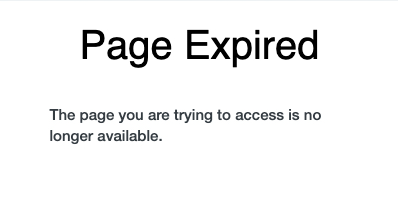
When you don't perform an action on the Jeppesen Distribution Manager Pro (JDM Pro) Sign In page, the session expires after 30 minutes, and an error message appears.

JDM Pro shows the following error message:
Procedure

  1. Close the page.
  2. Open a new browser tab and enter the following URL:
    https://jdmp.jeppesen.com
  3. Sign in to JDM Pro.
Jeppesen
Revision 1 for JDM Pro (Premium Tier) 2.25. Published 20 February 2026.
© 2026 Jeppesen ForeFlight, Inc. All rights reserved.
JEPPESEN FOREFLIGHT PROPRIETARY

EXPORT CONTROLLED - This technology or software is subject to the U.S. Export Administration Regulations (EAR), (15 C.F.R. Parts 730-774). No authorization from the U.S. Department of Commerce is required for export, re-export, in-country transfer, or access EXCEPT to country group E:1 or E:2 countries/persons per Supp.1 to Part 740 of the EAR. ECCN: EAR99