
Assigning content for review
You can set the content review policy to Manual for any content item. After you set the review policy, the policy stays in effect for subsequent versions of the content.
About this task
Before personnel can review a content item, assign the content to the appropriate review group and set the policy for the review process.
Note: When setting up your review policy for a content item, you select reviewers and
distribution groups. Before starting, ensure that the devices you want to review a
content item are assigned to the appropriate review group.
Procedure
-
From the Content page, select the content.
Jeppesen Distribution Manager Pro (JDM Pro) displays the Content Detail dialog.
FigureContent Detail dialog 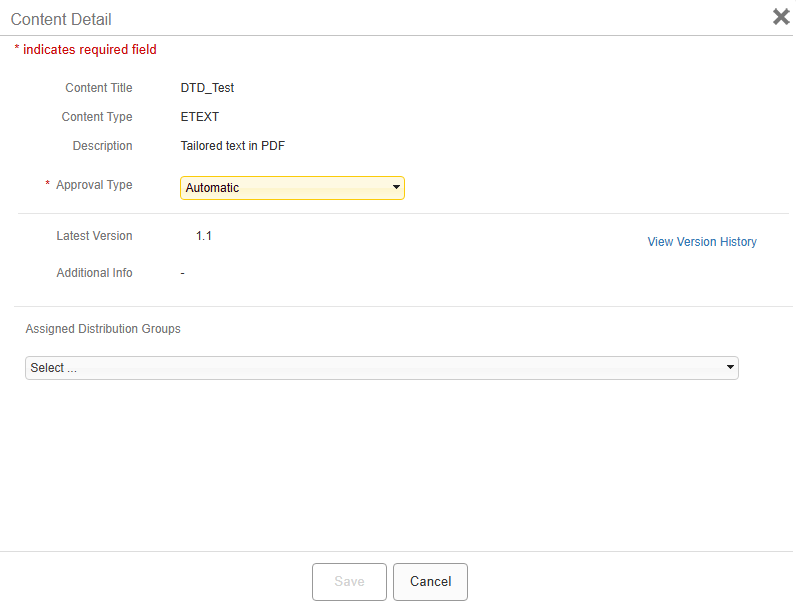
-
Select one of the options from the Approval Type menu:
- If you select Automatic, JDM Pro automatically approves the content item and any later versions of the content.
- If you select Manual, all content versions associated with this content item move to the Pending Approval status when they're published to JDM Pro. JDM Pro delivers content with a Pending Approval status only to devices who are set up as reviewers. JDM Pro doesn't deliver the content to other devices until the content item has been approved according to the content policy.
FigureContent Detail dialog with Approvers and Required menus 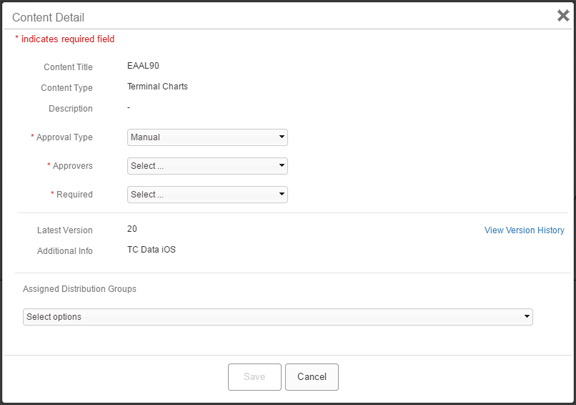
- From the Approvers menu, select one or more approvers.
- From the Required menu, select either All Approvers or Any Approver.
-
From the Assigned Distribution Groups menu, select the
review group.
Important: Ensure that the reviewers you selected are assigned to the distribution group that you select.
FigureContent Details dialog with Assigned Distribution Groups options 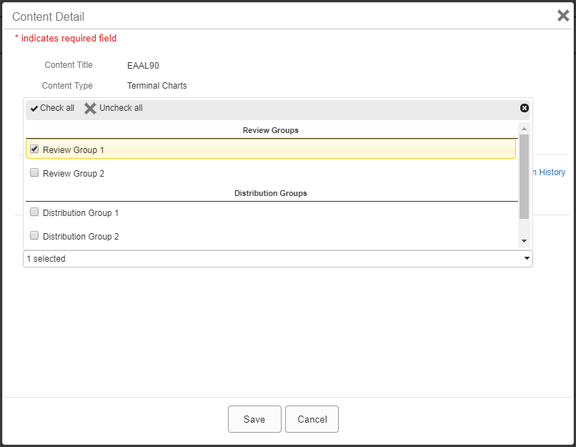
- From the Assigned Distribution Groups menu, select the distribution groups for final distribution of the content after it's approved.
-
Select Save.
JDM Pro displays a verification notification.
-
Select OK.
JDM Pro saves your changes.