
Application and Content Status
The Application and Content Status section of the Jeppesen Distribution Manager Pro (JDM Pro) Dashboard displays devices grouped by application version. Each card shows the number of devices with content in a particular state.
- View the total number of devices on which the app is installed.
- View the versions associated with the app.
- Expand or collapse the app name to view the list of versions under the app.
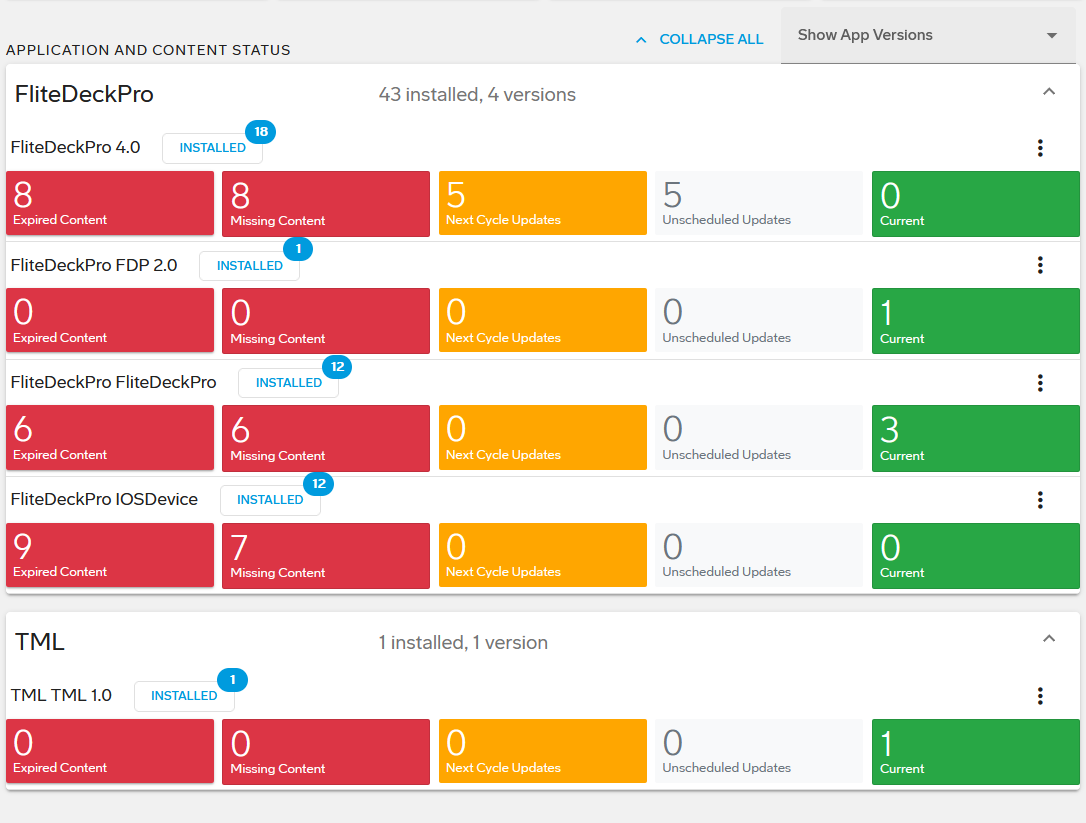
The number in the blue badge next to the name of the application shows how many devices have that specific application version installed. When you select the Installed button, Jeppesen Distribution Manager Pro (JDM Pro) shows the Devices page—filtered by the installed app version.
When you select a content status card, JDM Pro shows the Devices page—filtered by the content status and version of the installed app.
For each application, the Application and Content Status section shows the number of devices that have content in any of these five states:
- Expired Content
- The number of devices that have at least one content item that has expired.
- Missing Content
- The number of devices that are missing any version of an assigned content item. Selecting the card opens the Missing Content report.
- Next Cycle Updates
- The number of devices that have downloaded only valid, current content items, but also have new content waiting to be downloaded.
- Unscheduled Updates
- The number of devices that haven't downloaded the off-cycle content assigned to them. This number also includes devices that haven't downloaded content set to For Immediate Delivery.
- Current
- The number of devices that have downloaded the most recent content items that are assigned to it.